 Tempusxr
- Documentation
- Exemples de suivi d'images
Basic
Un voile léger aux vraies proportions de l'image, et une forme 3D animée au-dessus. C'est la forme habituelle d'une scène de RA : une couche plate sur l'image et des objets qui en sortent.
Essayer
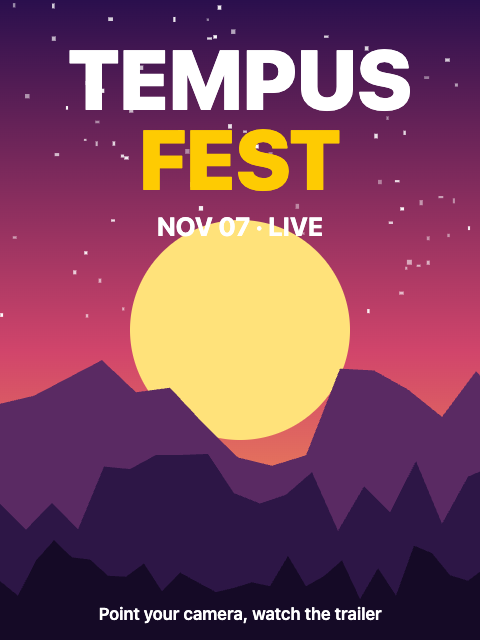
Ouvrez les démos sur un téléphone : la caméra a besoin d'une page sécurisée. Puis visez l'image ci-dessous, affichée sur un second écran ou imprimée.
A-Frame
tempusxr-image-plane donne au plan les vraies proportions de l'image. Le composant animation d'A-Frame fait tourner le nœud, sans JavaScript.
<!doctype html>
<html lang="en">
  <head>
    <meta charset="utf-8" />
    <meta name="viewport" content="width=device-width, initial-scale=1, viewport-fit=cover" />
    <title>Basic (A-Frame)</title>
    <!-- A-Frame, Tempusxr and the image tracker, as plain script tags. -->
    <script src="/node_modules/aframe/dist/aframe-v1.8.0.min.js"></script>
    <script src="/packages/sdk-aframe/dist/index.umd.cjs"></script>
    <script src="/packages/sdk-tracker-image/dist/index.umd.cjs"></script>
  </head>
  <body>
    <!-- Show poster.png to the camera: a light veil covers the poster and a knot spins above it. -->
    <a-scene
      tempusxr="tracker: image; targets: /examples/poster-video/poster.txr"
      renderer="alpha: true"
      vr-mode-ui="enabled: false"
    >
      <a-camera></a-camera>
      <a-light type="ambient" intensity="0.9"></a-light>
      <a-light type="directional" position="0.5 1 1" intensity="0.8"></a-light>

      <a-entity tempusxr-image-target="index: 0">
        <!-- tempusxr-image-plane gives the plane the real proportions of the image -->
        <a-plane tempusxr-image-plane color="#ffffff" opacity="0.2"></a-plane>
        <a-torus-knot
          position="0 0 0.25"
          radius="0.12"
          radius-tubular="0.03"
          color="#fecb02"
          animation="property: rotation; to: 0 360 360; dur: 8000; easing: linear; loop: true"
        ></a-torus-knot>
      </a-entity>
    </a-scene>
  </body>
</html>
Three.js
La taille d'une ancre est dans anchor.size. Tout ce qui bouge à chaque image va dans ar.session.onFrame(), qui s'exécute après le déplacement du contenu par le traqueur.
<!doctype html>
<html lang="en">
  <head>
    <meta charset="utf-8" />
    <meta name="viewport" content="width=device-width, initial-scale=1, viewport-fit=cover" />
    <title>Basic (Three.js)</title>
    <!-- Three.js with the SDK, as a page without a bundler loads it. -->
    <script type="importmap">
      {
        "imports": {
          "three": "/node_modules/three/build/three.module.js",
          "@tempusxr/sdk-core": "/packages/sdk-core/dist/index.js",
          "@tempusxr/sdk-three": "/packages/sdk-three/dist/index.js",
          "@tempusxr/sdk-tracker-image": "/packages/sdk-tracker-image/dist/index.js"
        }
      }
    </script>
    <style>
      html,
      body {
        margin: 0;
        height: 100%;
        background: #111;
      }
    </style>
  </head>
  <body>
    <!-- Show poster.png to the camera: a light veil covers the poster and a knot spins above it. -->
    <div id="ar"></div>
    <script type="module">
      import * as THREE from 'three';
      import { create } from '@tempusxr/sdk-three';
      import '@tempusxr/sdk-tracker-image';

      const ar = create({ container: '#ar' });
      window.__ar = ar;
      const tracker = await ar.use('image', { targets: ['/examples/poster-video/poster.txr'] });
      const size = tracker.anchors[0]?.size ?? { width: 1, height: 1.333 };

      const content = new THREE.Group();
      content.add(new THREE.AmbientLight(0xffffff, 1.2));
      const sun = new THREE.DirectionalLight(0xffffff, 1.5);
      sun.position.set(0.5, 1, 1);
      content.add(sun);

      // A veil with the real proportions of the poster.
      content.add(
        new THREE.Mesh(
          new THREE.PlaneGeometry(size.width, size.height),
          new THREE.MeshBasicMaterial({ color: '#ffffff', transparent: true, opacity: 0.2 }),
        ),
      );
      const knot = new THREE.Mesh(
        new THREE.TorusKnotGeometry(0.12, 0.03, 100, 16),
        new THREE.MeshStandardMaterial({ color: '#fecb02' }),
      );
      knot.position.z = 0.25;
      content.add(knot);
      ar.attach(tracker.anchors[0], content);

      // Called every frame, after the tracker moved the content.
      ar.session.onFrame(() => {
        const t = performance.now() / 1000;
        knot.rotation.set(t * 0.8, t * 0.8, 0);
      });

      await ar.start();
    </script>
  </body>
</html>
À retenir
- Les lumières font partie du contenu : ajoutez-les dans le groupe qui suit l'ancre.
- Ne créez jamais d'objets dans la fonction appelée à chaque image : réutilisez-les, pour que le téléphone ne saccade pas.