 Tempusxr
- Documentation
- Exemples de suivi d'images
Minimal
La plus petite page qui pose du contenu 3D sur une image : un fichier cible, une boîte. C'est le point de départ de tous les autres exemples.
Essayer
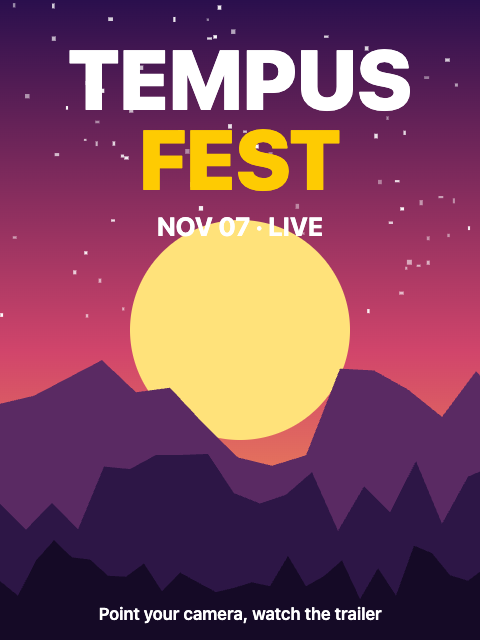
Ouvrez les démos sur un téléphone : la caméra a besoin d'une page sécurisée. Puis visez l'image ci-dessous, affichée sur un second écran ou imprimée.
A-Frame
Une a-scene avec le composant tempusxr indique le traqueur et le fichier cible. Le contenu va dans une entité marquée tempusxr-image-target : elle suit l'image numéro index et se cache quand l'image est perdue.
<!doctype html>
<html lang="en">
  <head>
    <meta charset="utf-8" />
    <meta name="viewport" content="width=device-width, initial-scale=1, viewport-fit=cover" />
    <title>Minimal (A-Frame)</title>
    <!-- A-Frame, Tempusxr and the image tracker, as plain script tags. -->
    <script src="/node_modules/aframe/dist/aframe-v1.8.0.min.js"></script>
    <script src="/packages/sdk-aframe/dist/index.umd.cjs"></script>
    <script src="/packages/sdk-tracker-image/dist/index.umd.cjs"></script>
  </head>
  <body>
    <!-- Show poster.png to the camera. The box sticks to the poster. -->
    <a-scene
      tempusxr="tracker: image; targets: /examples/poster-video/poster.txr"
      renderer="alpha: true"
      vr-mode-ui="enabled: false"
    >
      <a-camera></a-camera>
      <a-entity tempusxr-image-target="index: 0">
        <a-box position="0 0 0.15" scale="0.3 0.3 0.3" color="#fecb02"></a-box>
      </a-entity>
    </a-scene>
  </body>
</html>
Three.js
create() construit la caméra, la scène et l'overlay. ar.use('image', ...) charge le fichier cible et donne une ancre par image. ar.attach(ancre, objet) fait suivre cette ancre par un objet.
<!doctype html>
<html lang="en">
  <head>
    <meta charset="utf-8" />
    <meta name="viewport" content="width=device-width, initial-scale=1, viewport-fit=cover" />
    <title>Minimal (Three.js)</title>
    <!-- Three.js with the SDK, as a page without a bundler loads it. -->
    <script type="importmap">
      {
        "imports": {
          "three": "/node_modules/three/build/three.module.js",
          "@tempusxr/sdk-core": "/packages/sdk-core/dist/index.js",
          "@tempusxr/sdk-three": "/packages/sdk-three/dist/index.js",
          "@tempusxr/sdk-tracker-image": "/packages/sdk-tracker-image/dist/index.js"
        }
      }
    </script>
    <style>
      html,
      body {
        margin: 0;
        height: 100%;
        background: #111;
      }
    </style>
  </head>
  <body>
    <!-- Show poster.png to the camera. The box sticks to the poster. -->
    <div id="ar"></div>
    <script type="module">
      import * as THREE from 'three';
      import { create } from '@tempusxr/sdk-three';
      import '@tempusxr/sdk-tracker-image';

      const ar = create({ container: '#ar' });
      window.__ar = ar;
      const tracker = await ar.use('image', { targets: ['/examples/poster-video/poster.txr'] });

      // The anchor is the poster: 1 unit wide, centered, and +Z comes out of it toward you.
      const box = new THREE.Mesh(
        new THREE.BoxGeometry(0.3, 0.3, 0.3),
        new THREE.MeshBasicMaterial({ color: '#fecb02' }),
      );
      box.position.z = 0.15;
      const content = new THREE.Group();
      content.add(box);
      ar.attach(tracker.anchors[0], content);

      await ar.start();
    </script>
  </body>
</html>
À retenir
- L'ancre, c'est l'image : large de 1 unité, centrée, et +Z sort de l'image vers vous. Une boîte large de 0,3 fait 30 % de la largeur de l'image.
- Aucun code d'overlay n'est nécessaire : l'interface intégrée affiche les boutons et les écrans d'erreur.